How Creative Agencies Use AI Tools to Improve Daily Work

AI tools for creative agencies
Binisha Katwal
1 min read
October 14, 2026

AI tools for creative agencies are software programs that do everyday tasks like graphic design and text writing. These systems help our office teams finish client work much faster. We use them to manage daily projects without working late hours.

Understanding AI tools for creative agencies

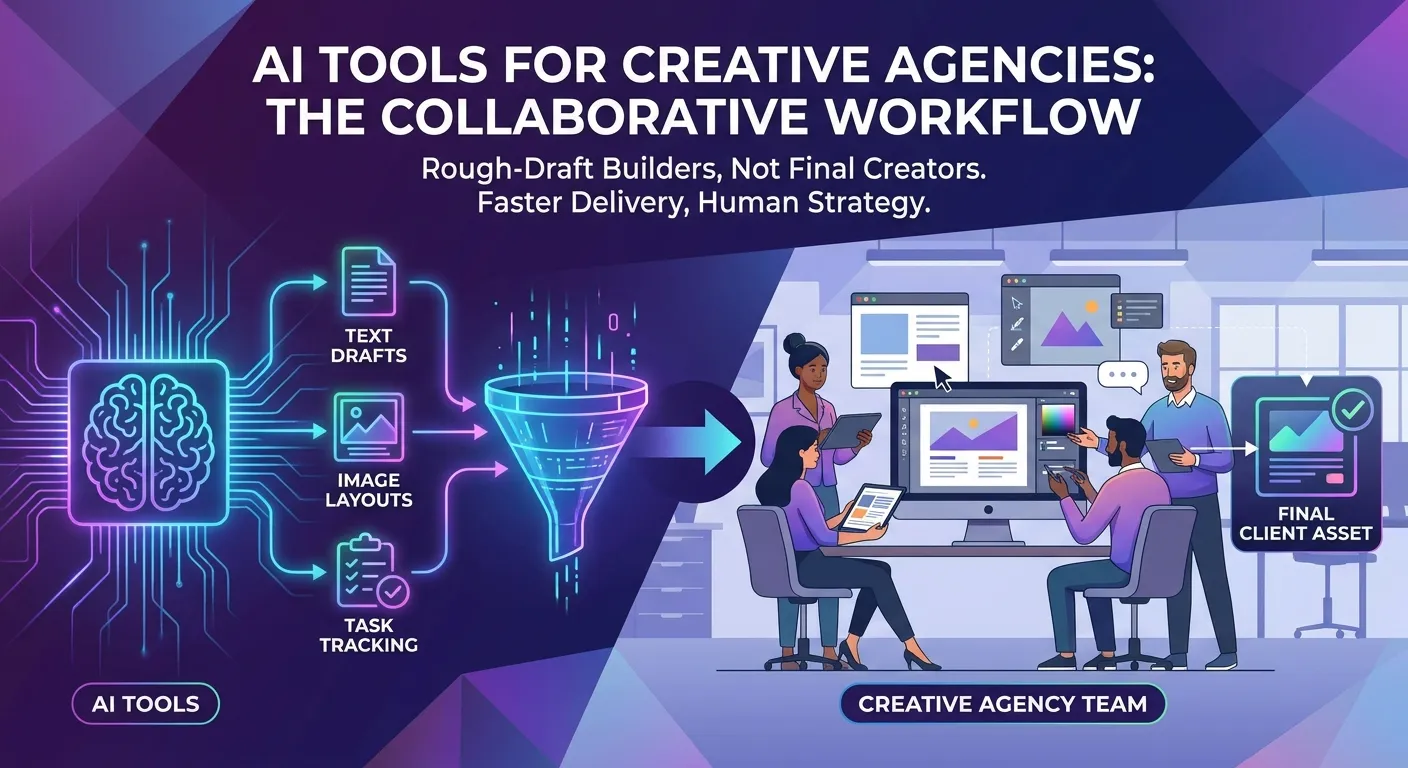
When we look at AI tools for creative agencies, we see different types of software built for daily office jobs. These programs handle the boring tasks so our workers can focus on client strategy. We put these programs into a few main groups based on what our staff needs most.

  • Programs that write text for websites
  • Software that makes pictures and layouts
  • Systems that track our daily office tasks

Software for visual design

Our teams can very quickly make pictures with design software. The program takes a short text prompt and generates a digital image in seconds. The quick pictures are used by our designers as a starting point, not as the final product. Ten quick ideas gives the client a direction to go before we do the hard work. Once the client picks one of the ideas, our human employee builds the real file from scratch. This process saves us days of rough-draft drawing.

Systems for writing text

Writing Systems are teaching our team how to write blog posts and social media updates. The software takes a brief prompt and generates a simple outline of text. We use these web pages to get over writer block and try out different ad ideas. The program is able to instantly convert a short list of product features into full paragraphs. A human always edits and reads the text so it fits the voice the client wants.

Programs for tracking projects

Tracking programs organize our daily tasks and guess how long projects will take. These tools look at our past work to tell us when a new job will be done. They hand out tasks to our staff based on who has free time today. This setup stops our team from getting too tired and keeps projects on time. If a designer is sick, the system finds someone else to do the work. The screen shows a map of what everyone is doing right now. Managers use this map to fix urgent problems fast. We use this software to track time and watch our budgets.

Core insight on software use

AI tools for creative agencies work best as rough-draft builders rather than final creators. We notice that using the software for the middle steps of a project causes more errors than using it only for the very first outline. Keeping the computer out of the main creative middle steps actually speeds up the final delivery time.

Finding the best AI tools for creative agencies

Finding the best AI tools for creative agencies takes a close look at our specific office needs. We check what our team actually does before we buy expensive software. Buying too many programs at once confuses our staff and wastes money.

  • Checking which tasks take the most time
  • Planning how much money we can spend
  • Making sure the software is safe to use

Checking our office workflow

We start by looking at what our staff does every single day. We find the exact steps that take hours and involve boring, repeated actions. If our team spends hours changing picture sizes for social media, we look for software that does that exact job. Asking the staff about their hardest tasks helps us fix real problems. Fixing real problems makes sure our workers actually use the new software. We write down exactly how many minutes a task takes before and after we get the program.

Planning the software budget

Planning our budget means adding up the monthly fees for the whole team. A lot of these platforms charge in US dollars, so our local costs change with the exchange rate. A good professional program might cost 3000 to 7000 NPR for each worker every month. We check if the time we save is worth this monthly cost. Some offices buy lots of programs, but we connect basic tools to our own computer systems. This keeps our data safe and lowers our monthly bills. We like paying one flat fee instead of paying for each user. We check our bills every three months and cancel programs we do not use.

Keeping client data safe

Keeping data safe is a big deal when we use outside software. We have to make sure the program does not use our client secrets to teach its public system. In Nepal, we must follow local computer rules and respect our global clients. We always read the rules to make sure we own our data. We sign papers with the software makers before we upload any secret plans. We tell our staff to never put client money details or secret product names into public text boxes. Following strict rules stops us from leaking big corporate secrets. Keeping secrets safe is more important than working fast.

Good results from AI tools for creative agencies

The main reason we use AI tools for creative agencies is to make our daily work easier. These programs change how we handle lots of work under tight deadlines. We see real improvements in many parts of our regular office work.

  • Less time spent on boring tasks
  • Getting more work done in the same amount of time
  • Keeping brand fonts and colors exact

Doing less boring work

Computer programs cut down the time we spend on jobs that do not need deep thinking. Taking backgrounds out of photos or making weekly numbers reports takes time away from real planning. The software handles these basic steps in seconds instead of hours. This big change lets our staff use their brains to solve hard client problems. We track this by counting how many working hours we save every single month.

Doing more work at once

Doing more work means finishing more projects without hiring new people right away. When a shop needs fifty different sizes of one picture, the software makes them instantly. We look at all the pictures and pick the best ones for the final ad. This tech lets a small office like ours take on big jobs from other countries. During busy times like the Dashain festival, this software helps us handle the huge rush. We can take extra work because the computer does the heavy lifting of making different files.

Keeping brand colors and fonts exact

Keeping a brand looking the exact same everywhere is hard for humans to check perfectly. Good software can read the rule book and flag any wrong colors or words right away. We use these quick computer checks before we send any work to the client. Finding a wrong text size before the client sees it keeps us looking professional. The software works like a reader who never gets tired. This check stops the client from asking for lots of changes at the end.

Hard parts of using AI tools for creative agencies

Bringing AI tools for creative agencies into the office is almost never completely smooth. We face exact problems when we give new tech to a team of established workers. Knowing these problems early helps us make a good plan to fix them.

  • Teaching the staff how to use the programs
  • Relying too much on the internet working
  • Checking the final work quality by hand

Teaching staff to use new software

Good training takes time away from our paying client work. Workers need to learn how to type the right instructions and know what the software cannot do. We cannot just give out passwords and expect everyone to work faster on the first day. A solid learning time is needed to make the team feel confident. We have a short class every Friday afternoon to share new tips we found. Learning all the time makes sure we get full value from the software bills.

Worrying about internet outages

If the website is down, you are taking a big risk by depending on web software. If the outside server goes down, our work stops, unless we know how to do it manually. We have a solid human backup plan in place for all big client jobs. True professional skill is knowing how to draw and write, not how to click buttons. We do practice runs sometimes where the team has to do a job without any help from the software. This keeps our real skills sharp.

Checking the final output

Checking the final work is the most important step in our whole office. Computer systems often make fact mistakes or draw pictures with weird fingers or shapes. We treat all computer work as a rough draft that a human absolutely must check. A head worker always reads the facts and looks at the picture before we send the file out. If a system draws a bad face, the human designer fixes it using normal drawing tools. Our human touch is the real mark of our agency quality.

Do these computer systems replace human office workers?

These systems do not replace human digital designers at all. They just help human workers by speeding up basic layout tasks and early idea drawing.

Can search engines tell if text is written by a computer?

Search engines can spot computer text patterns very fast. This is why human writers must rewrite all rough drafts before we put them on the internet.

Are these web programs safe for secret client files?

Paid business programs offer safe places for private client files. Free versions use what you type to teach their open systems, which makes them bad for secret data.

How much internet speed do these applications need?

Most of these systems run completely on remote internet servers. A normal internet line of 50 Mbps is good enough for basic daily office work.

Conclusion

Bringing AI tools for creative agencies into our office is a natural step for modern work. These software systems help us finish tasks faster and manage our heavy daily projects better. We know that picking the right tools takes careful money planning and a lot of human checking. By focusing on real work problems, our team delivers better results to clients while keeping our deep human skills sharp.


Recent Blogs